Find your coffee machine — model identification and repair guides
Choose your exact model to find its repair guides, linked parts and available exploded-view diagram. If you only know the name on the front, first read the model label: Magnifica, PrimaDonna, LatteGo and IMPRESSA can cover several different machines.
1. Read the model label
Copy the complete model/type code, including dots, letters, slash suffixes and any revision. Keep the serial number or production code separately; it is additional information, not a substitute for the model.
Brand | What to copy | Where to start |
|---|---|---|
De’Longhi | Full ECAM, ESAM, ETAM, EPAM or EXAM code; retain the colour suffix and EX revision if shown | The rating label is usually on the base. A separate label behind the water tank may only identify the serial number. |
Philips / Saeco | Full model code, including any /xx suffix, and TYPE if shown | For the EP/HD machines covered by these guides, check inside the service door. |
Siemens / Bosch | Full E-Nr, including its /xx suffix; record FD separately | Check the rating plate. Its position varies by model, including behind the drip tray, tank or service cover. |
Nivona | Full NICR or NIVO model code and any type/revision information | Check behind the removed drip tray; some machines use a different position. |
Jura / Melitta / Miele | Complete model name and any type/product identifier on the rating label | Use the label-location illustration in your machine’s owner manual if the label is not readily visible. |
Before looking underneath: switch off, unplug and let the machine cool. Empty and remove the water tank and drip tray before carefully tilting a machine. Ask for help with a heavy machine. Reading the model label should not require dismantling the housing.
2. Choose your model
Each model page below collects the guides that identify that machine. Keep revisions and generations separate, especially when selecting electronics or a complete brew unit.
De’Longhi
Model | Available guides |
|---|---|
Weak coffee and grinder under-dosing; original-board identification | |
Complete reassembly, wiring, hydraulic routing and parts | |
Upper infusion-piston assembly replacement | |
Boiler overhaul, drive-spindle work and complete restoration |
Jura
Model | Available guides |
|---|---|
Component layout, brew-unit removal, coffee spout and Z5 diagram | |
Drainage-valve plunger repair, housing and brew-unit access | |
Brew-unit removal for overhaul or Error 8 investigation | |
No coffee, blocked valve, spout cleaning, descaling and overhaul | |
Fill Beans warning, clogged spout, milk foam and descaling | |
Brew-unit and spout overhaul, grinder cleaning and descaling | |
Water-flow blockage, grinder service and brew-group resealing | |
Housing disassembly and brew-group removal | |
Error 8, brew-group overhaul and grinder-chute clearing | |
Restoration and brewing-unit service for the older ENA 5 generation |
Philips & Saeco
Model | Available guides |
|---|---|
Thermal-fuse, hydraulic-leak and grinder repair; copy your full /xx suffix |
3. Model not listed?
Search the knowledge base using the full code from your label. You can also browse the brand guides below or use the Brewive model-specific parts diagrams.
De’Longhi · Philips & Saeco · Jura · Siemens · Melitta · Miele · Nivona
A nearby model name can help you find a related guide, but it does not establish the same cover layout, wiring or replacement part. Read the guide’s model and revision details before following it.
Label-location examples
These Brewive illustrations show example locations; the position can vary by model. See the illustrated guide to finding your model and serial number for more help.
De’Longhi
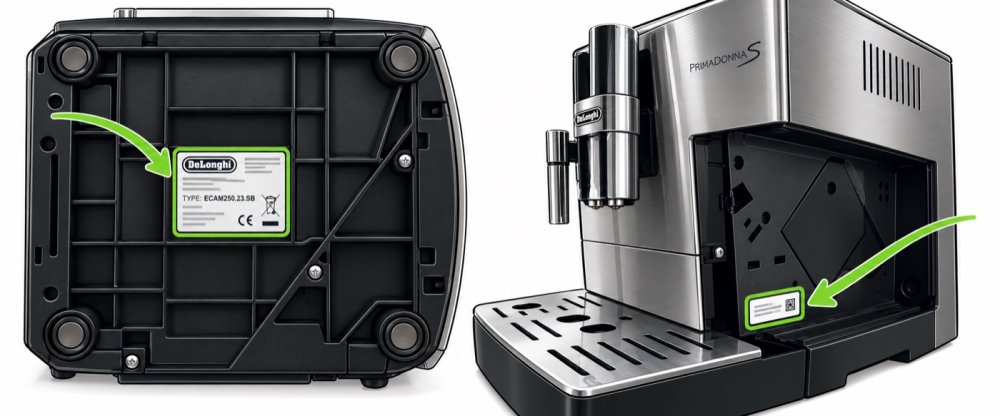
DeLonghi example: model label on the base and separate serial-number label behind the water tank
De’Longhi example: the model/type is on the base label at left. The label behind the tank at right is the serial-number label; it does not replace the model code.
Philips
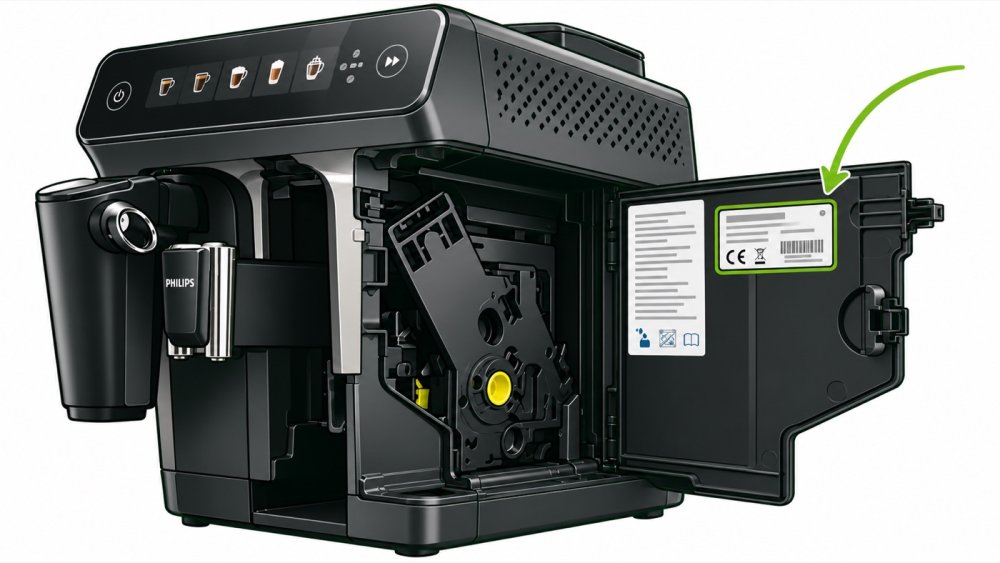
Philips example: rating label on the inside of the service door
Philips example: the rating label is inside the service door. Copy the full model code, including the slash suffix.
Nivona
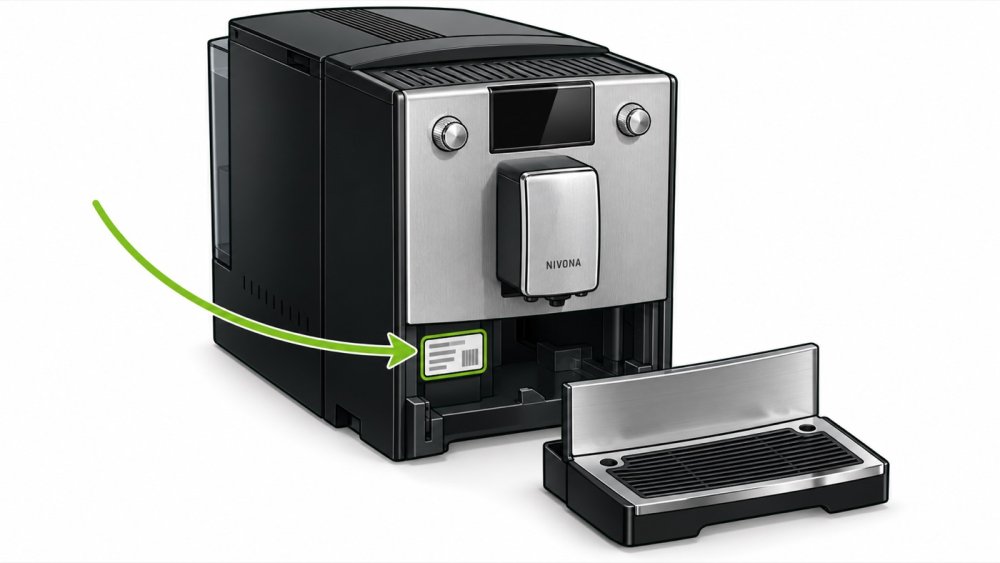
Nivona example: label visible after removing the drip tray
Nivona example: the label is visible with the drip tray removed. Other models may place the label elsewhere.
Siemens
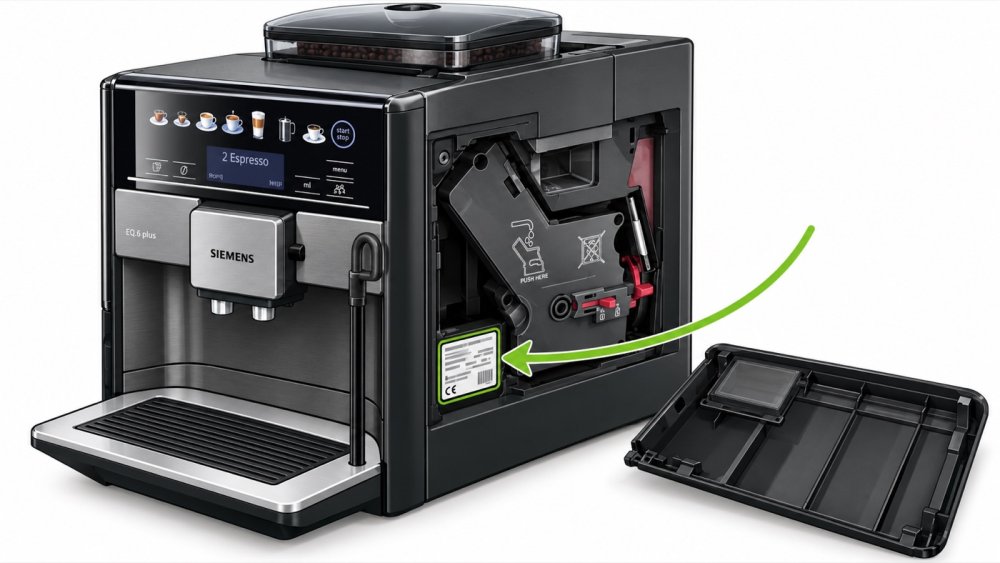
Siemens EQ6 plus example: rating label beside the brew unit behind the right service cover
Siemens EQ.6 plus example: the label is beside the brew unit behind the right service cover. On other Siemens models the position can differ.
What to include when asking for help
The full model/type code and revision from the label.
The exact error message or the symptom, including when it happens.
A clear photo of the model label and, for an already removed replacement part, its printed part number and connectors.
Send the full serial number privately when it is needed to identify a production variant.
Manufacturer identification help
Philips EP4300 owner manual — an example of the service-door type label.